How to Do the Burning Bridges Trend: Free, Step by Step (2026)
How to do the Burning Bridges trend with AI, a CapCut template, or free editing tools: step-by-step instructions, photo tips, and what to know before you post.
October 11, 2026
The short answer
A straightforward way to join the Burning Bridges trend is to turn one portrait into a party-performance video with AI. Your chosen character takes the lead, with the scene, gestures, and soundtrack already supplied by the template. An editing template helps arrange existing photos or clips; filming your own version means performing the moves yourself.
Our AI workflow runs in your browser and needs no prompt or separate music upload. Generation uses paid credits, and one-time packs are available if you do not want a subscription.
What's new on this page
- October 11, 2026 — Expanded the variations and added dollar prices and CapCut search instructions.
- October 11, 2026 — Added screenshots of the photo input, template, and video settings, plus reference examples.
- October 11, 2026 — Guide published, including free editing options and soundtrack details.
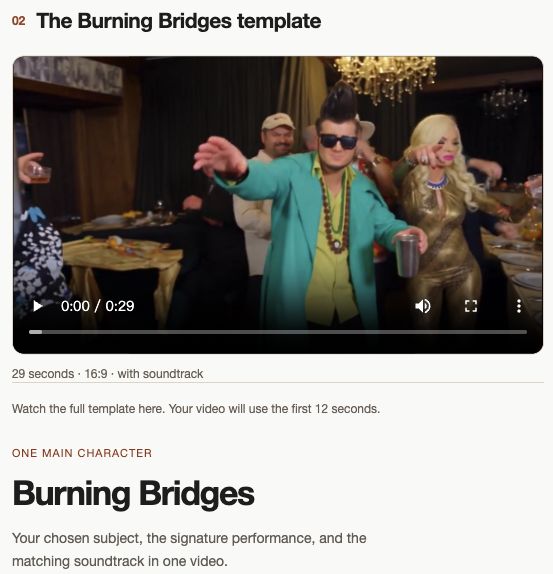
The Burning Bridges trend puts a new main character into a remake inspired by Drake's party performance: warm chandeliers, a crowded room, a drink in hand, and gestures toward the camera. The appeal is seeing a familiar face step into that scene, whether it is you, a friend, or a character.
Here are the three main approaches, the steps for making an AI version, and the free options to consider.
Three ways to do the Burning Bridges trend
- An AI video generator (a photo becomes a performance). Upload one portrait and let a prepared template guide the new video. AI Burning Bridges includes the party setting, performance, and soundtrack, so you can put your chosen character into the scene without filming. You select the video length and quality; the scene and routine stay fixed. The template preview shows what you are starting from.
- A CapCut template (an edit using your media). Add photos or clips to a preset edit with its own timing, effects, and music options. What it creates depends on the template: an ordinary photo montage does not automatically animate your character through the party performance. See the template search instructions below.
- Filming it yourself. Bring friends into a warm indoor setting, pick up a cup, and rehearse the gestures. You choose the performance and camera angles, then edit your footage into a short clip.
How to do the Burning Bridges trend with AI, step by step
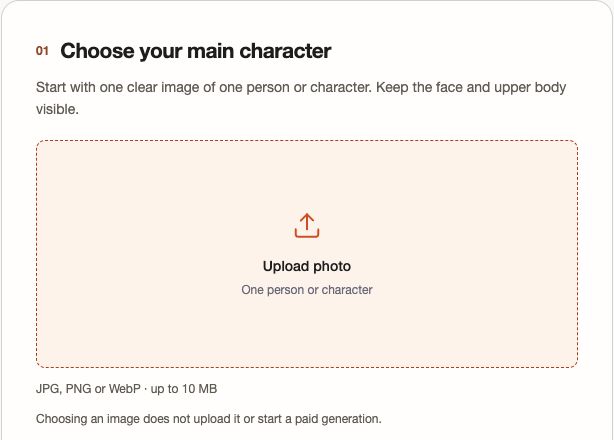
- Pick your main character. Choose yourself, a willing friend, or a character. The template puts one subject in the lead.
- Prepare one clear photo. Show the face and upper body in good light. Crop group pictures to your chosen person.
- Open the Burning Bridges AI video maker. Add your photo on your phone or computer. JPG, PNG, and WebP files up to 10 MB work.
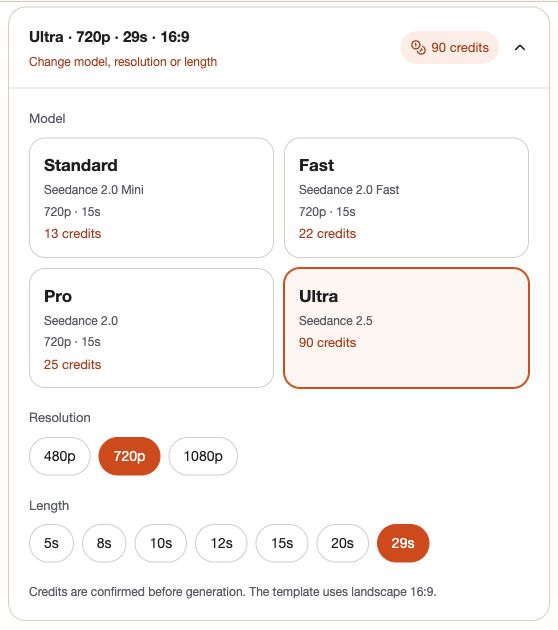
- Choose your video settings. Use Standard at 720p for a 12-second opening clip, or Ultra at 29 seconds for the full routine.
- Start your remake. Tap “Make My AI Burning Bridges Video,” sign in if needed, and confirm the displayed credit quote.
- Watch and download. When generation finishes, save your landscape 16:9 MP4 with music. You can also find completed videos in your account.
Burning Bridges trend variations: one photo, pets, and what came next
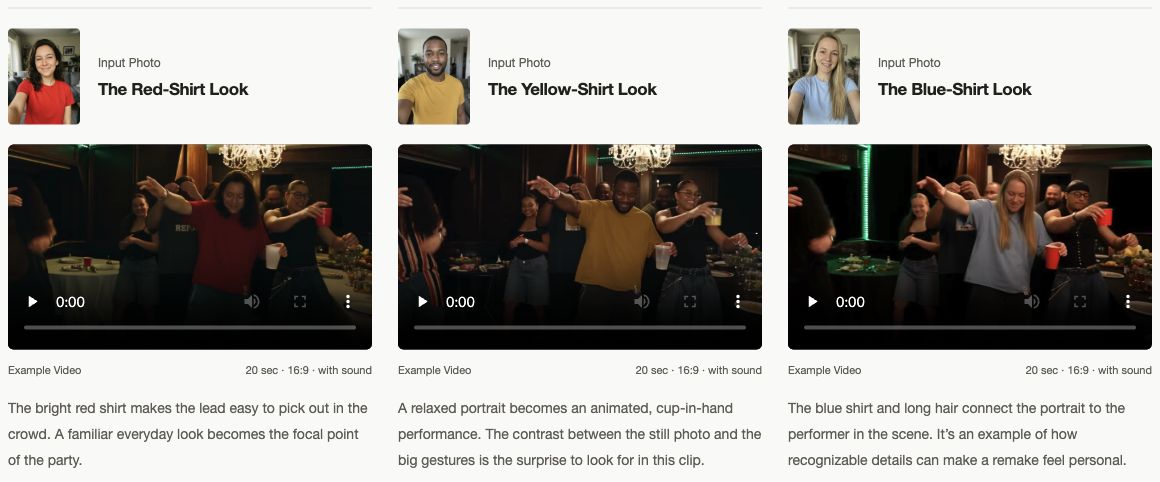
- One photo of you. Try a graduation portrait, a favorite outfit, or a friend's everyday selfie. A formal look dropped into the lively party makes a different joke from a casual one. Keep the outfit visible in your photo.
- With your dog or cat. Picture your pet taking over the party. Start with a clear view of its face and body, and use a generator with an animal-photo template; our current workflow is designed for people or characters.
- Other trends to try next. Try an orange-booth Hotel Lobby duet, a Raindance remake, or a Bulin 47 dance. Each uses its own performance template; the same clear portrait can be your starting point.
How to do the Burning Bridges trend for free
- AI Burning Bridges: no free generation. A $9.90 one-time pack buys 10 credits, enough for Standard, 720p, 12 seconds. Ultra, 720p, 29 seconds needs 90 credits; the $59 pack includes 200. Completed videos include the MP4 download. Compare current plans.
- CapCut: search “Drake Burning Bridges” in Templates. If a matching free template is available, preview it, choose “Use template,” add your media, and export. Check the final screen for charges. See CapCut's template instructions.
Templates vary by region and can disappear. If none matches, edit your own footage with free tools. Check that a “free” offer covers the download too.
Tips for a better Burning Bridges video
- Use even lighting and an unobstructed face. Keep the upper body visible, with no sunglasses or masks.
- Choose 29 seconds if you want the later gestures. Short clips use the opening rather than condensing the complete routine.
- For a vertical post, crop the landscape download carefully so the face, cup, and moving hands stay visible.
Original song or AI song?
The song behind the trend is Drake's “Burning Bridges.” Our maker adds the recording supplied with the template, not a newly composed AI song or personalized rap. Play the preview with sound to hear the exact version you will get. Your MP4 includes the matching segment; choosing 12 seconds uses its opening. There is no separate music upload or song selector.
Do it respectfully
Make the joke something your subject can enjoy too. Use your own portrait or ask a friend before using theirs, and label realistic remakes as AI-generated when sharing. If this is your first encounter with the trend, read about Drake's Burning Bridges song and the original video behind it.
Need inspiration for your version? Take a look at the portrait and video examples.
Ready? Make your Burning Bridges AI video: one photo, your chosen character, and a party performance with music included.